Wednesday, September 8, 2010

InsideClipboard 1.11دانلود برنامه ی


Displays the content of all formats stored in the clipboard

Each time that you copy something into the clipboard for pasting it into another application, the copied data is saved into multiple formats. The main clipboard application of Windows only display the basic clipboard formats, like text and bitmaps, but doesn't display the list of all formats that are stored in the clipboard.

InsideClipboard is a small application that will display the binary content of all formats that are currently stored in the clipboard, allowing you to easily save the content of specific format into a binary file.

External Mirror 1 [ZIP]

Clipboard Help+Spell 1.40.01دانلود برنامه ی


Clipboard capture tool with history, favorites, spelling, formatting and more

Database stores history of all past text clipboard entries for easy viewing, modification and search. Use Clipboard Help+Spell for keeping hierarchical notes - sort, search, filter by text, last view date, modification date.

Super easy and super fast search function - or use complex filters if you need them - you'll never have a problem finding a note again! Organize your notes and clips any way you want - show them all or view by group or category; view your clips any way you like.

High-quality spellcheck - underlined mistakes; learning spellchecker. Configurable hotkeys for common functions. Powerful text formatting options - make your own presets for common functions. Simple functions for copying and pasting into and out of other applications.

External Mirror 1 [EXE]

ClipSa 0.1 Alphaدانلود برنامه ی


A very small tool for very quick picture saving

The ClipSa application was developed to be a very small tool for very quick picture saving. You put some picture into the clipboard (PrintScrn / Alt-PrintScrn / Ctrl-C) and ClipSa saves it to a file. The program supports BMP, JPG and PNG formats.

Goal: to minimize the number of actions (clicks) when saving a picture into a file. You put the picture in the buffer (PrintScrn / Alt-PrintScrn / Ctrl-C) click on Save and the picture is saved in a file. No intermediate programs (Paint, Photo Editor, ACDC, etc.) required.

The program works both in manual and in automatic mode. Manual mode allows you to save a graphic file via standard dialog "Save As". In automatic mode, files are saved in the directory specified in settings. The parameters (a graphic file format, file name pattern) is also configured.

The program is useful to all those who value their time. Among them:
- Technical writers, who makes a lot of snapshots for further inclusion in the documentation.
- Testers, who describes bugs and makes the descriptions test cases.
- Bloggers that wants to create a separate graphic files from other sources.
- People who don't want to bother with any graphic editors, and want to get a picture quickly and easily.
Requirements:

· NET Framework

Softpedia Secure Download (US) [ZIP]

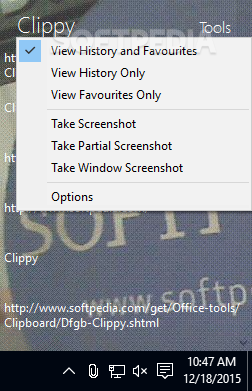
Clippy 1دانلود برنامه ی


A clipboard manager that will record images and text that have been copied to the clipboard.


Clippy is a lightweight application that allows you to view images and text copied to the clipboard.
Here are some key features of "Clippy":


· Record text and images from clipboard


· Pin items for easy access


· Upload to images to ImageShack


· Quick screenshots


· Customisability


Requirements:


· .NET Framework 4.0


Cliptonomy 2.1دانلود برنامه ی


Manage your clipboard's content with this application.

Cliptonomy is a handy, easy to use Clipboard extension specially designed to allow users to save Clipboard content for future use.
What's New in This Release:
· Upgrade adds ability to email selected files from within program

Softpedia Secure Download (US) [ZIP]